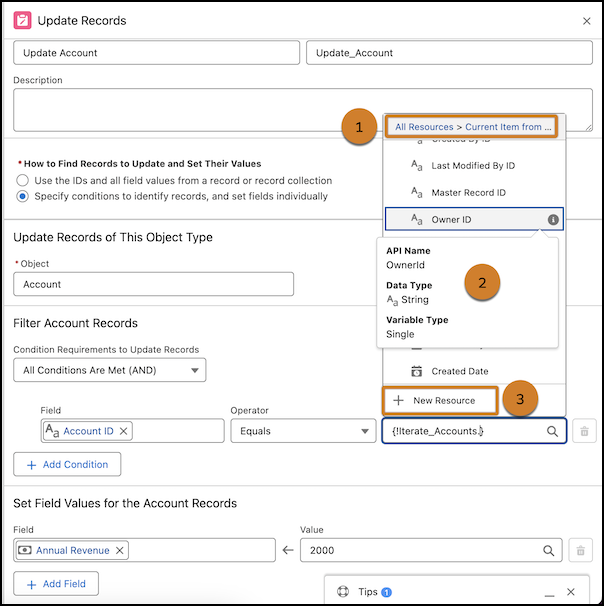
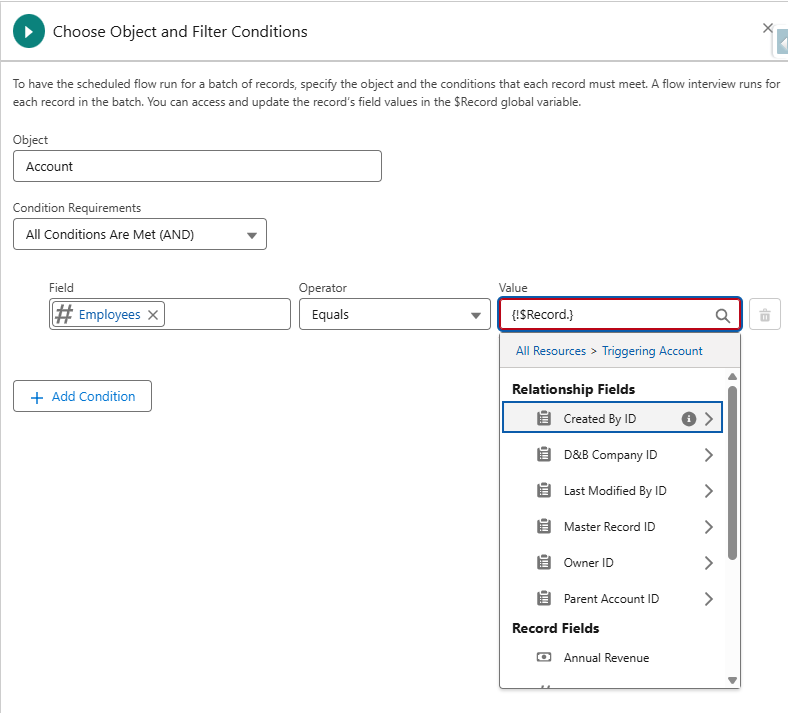
With this update, Flow Builder makes it easier to select resources for Start element triggers for schedule-triggered flows and for Update Records, Get Records, and Delete Records elements for all flow types. We now group the fields and values of manually selected objects with clearer labels to help you identify and select resources more easily
Where: This change applies to Lightning Experience and Salesforce Classic (not available in all orgs) in Essentials, Professional, Enterprise, Unlimited, and Developer editions
How: Create or open a schedule-triggered flow. For the Start element, select the object that you want to work with. In a row that defines a condition, click in Field and Value to show clearly labeled groups of resources
For Update Records, Get Records, and Delete Records elements, use the clickable breadcrumb path (1) to navigate through resource groups. Icons indicate different resource types. To get details (2) about a resource, hover over its info icon. To create a new resource, click New Resource (3)